How to Use Chat GPT in Your Design Process: 11 Advanced UX Tasks
How to do AI-assisted design with Chat GPT + 35 UX-specific prompts to get started
Reading time: 17 minutes

[made with Midjourney]
If you haven’t heard of Chat GPT, it’s your new robot assistant/overlord.
The evolution of these tools means a whole new field is developing: AI-assisted design. What’s the top tool for AI-assisted design? Chat GPT (short for Chat Generative Pre-trained Transformer) is your new go-to. It’s a natural language processing (NLP) model trained on a large dataset of human conversation.
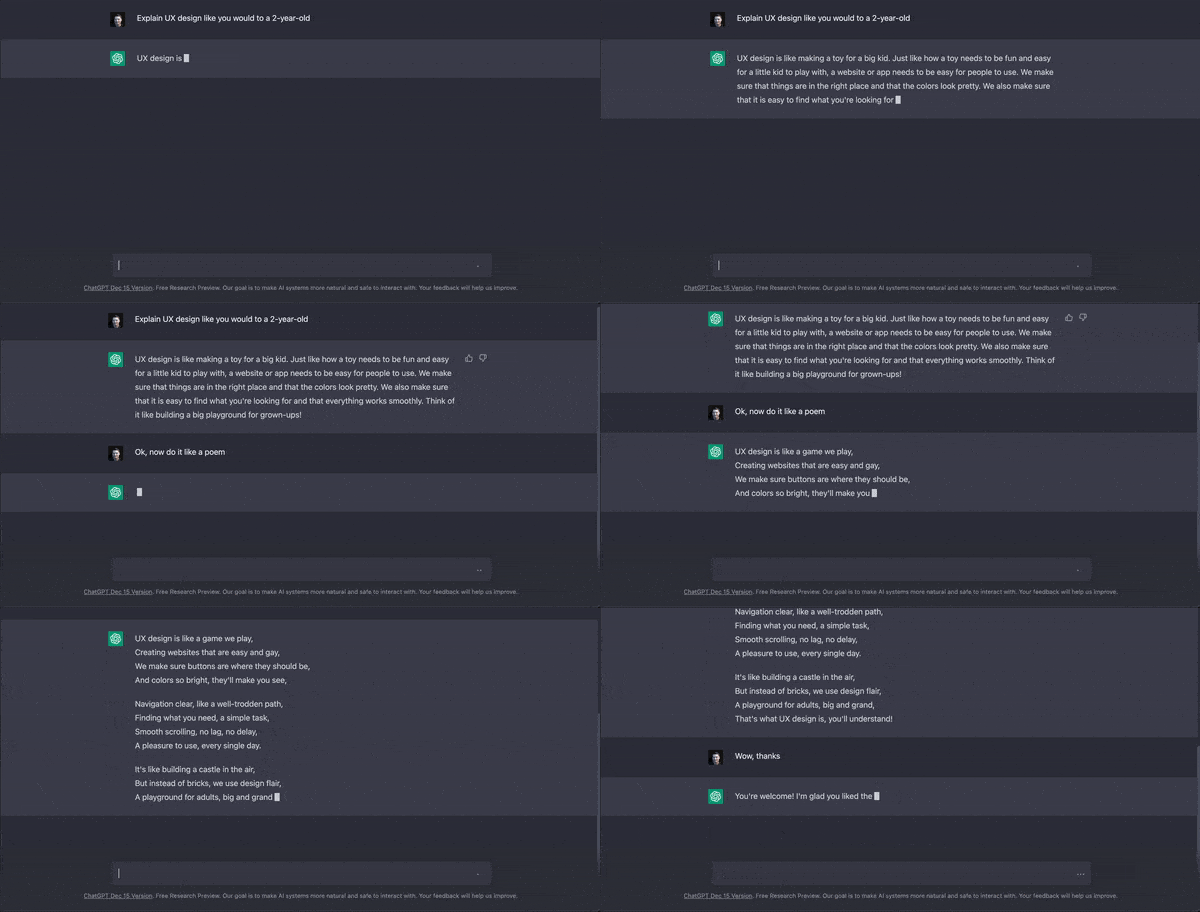
[Chat GPT explains UX simply, Chat GPT Research Preview, 2023]
Developed by OpenAI, Chat GPT can generate human-like responses to user input in various contexts. It can be integrated into chatbot or voice assistant systems to improve the user experience of the text.
But it can also change how you design.

[made with Midjourney]
Why designers should care about AI-assisted design
AI-assisted design is poised to change design forever.
Chat GPT got to a million users in only five days! To put that into context, here is how other tech companies compare:
Time to reach 1 million users:
Netflix - 3.5 years
Kickstarter - 2.5 years
Airbnb - 2.5 years
Twitter - 2 years
Facebook - 10 months
Spotify - 5 months
Instagram - 2.5 months
iPhone - 74 days
ChatGPT - 5 days
[Statista, 2023] To me, that virality speaks to the incredible usefulness of this tool. And designers have been some of the first to jump on this tool. If you don’t learn how these tools work, you won’t be able to take advantage of the possibilities in these AI technologies.
“Everything that can be automated will be automated”
Not only are AI tools like Chat GPT going to improve your process, but they’re also going to improve the user experience of text interfaces everywhere, starting with chatbots and application micro-copy. Soon, users will expect this natural language processing, making it a desirable feature for any software.
Chat GPT feels like having a personal AI assistant, and who doesn’t want one of those? This tool is here to stay so let’s learn how to use it.

[made with Midjourney]
11 Advanced UX tasks Chat GPT can automate
Welcome to your new, AI-assisted design process. Here are the tasks that are ripe for AI assistance in UX design:
Writing
a.k.a. asking Chat GPT to write copy
This is the most obvious one, but Chat GPT is very good at writing. The tool can proofread like Grammarly and write creative responses when prompted. You can say, “Write me a _______,” and it will do it. Try telling it to “Write a love poem about users” if you want an instant smile. You even can tell it: “Write a blog post about AI and subtly push for its adoption.” It’s incredible how it can instantly shift perspective and motivation.
Prompt examples for writing:
Write an introduction email for a user interview.
Write several copy alternatives for a download button for an e-commerce website.
Write ten survey questions about onboarding, starting with basic info.
Searching
a.k.a. seeking answers to basic questions using Chat GPT
Before there was Chat GPT, you had to use the first page of Google to get informed about a topic. Now you can understand common knowledge without diving through tons of websites. “What are the best practices around ______?” will surface a well-articulated answer that summarizes how to best design for a specific context.
Prompt examples for searching:
What are common issues with mobile apps?
What are the best practices for the design of voice interfaces?
What design patterns work best for a ride-sharing service?
WARNING: Chat GPT can output incorrect facts, and it’s impossible to spot a wrong answer because the outputs are so convincing and natural. Consider using Google for facts; please don’t believe everything it generates.
Researching
a.k.a. doing desk research with Chat GPT
Chat GPT is the best desk research tool on the planet. It’s particularly good at describing common knowledge. “What’s a good user experience for a flight?” Based on that response, Chat GPT will tell you the user expectations for a flight. Chat GPT is a great place to start and end a research project.
Prompt examples for researching:
What’s a good user experience for a flight?
What underlying needs might busy founders have for grocery shopping?
How is gamification used in productivity apps?
Inspiring
a.k.a. asking Chat GPT things to improve your design process
“What sort of design method works best for testing new ideas?” That’s an example of a question you might ask if you need inspiration about which design method to use. “What are some ways to design for mobile?” That’s another example of how you could be inspired during a design project.
Prompt examples for inspiring:
What kinds of UX methods will help me uncover user needs?
List some fun icebreakers for an online workshop.
Brainstorm ideas for an NFT website.
Creating
a.k.a. asking Chat GPT to make stuff
Chat GPT is currently limited to text responses but is still very creative. You can ask it to generate wireframes, SVGs, and HTML code. All you need is the right prompts and context. You can even have it generate a text prompt for another AI tool like DALL-E. Yes, they’re already communicating with each other!
Prompt examples for creating:
Make a wireframe for a journaling app.
Create information architecture for a pregnancy tracking app.
Design an SVG icon for a doggy daycare service.
Code me a UX portfolio site.
Personalizing
a.k.a. asking Chat GPT to adapt content to specific types of people
Personalizing lets you customize your work to a specific character. Let’s say you want to write some micro-copy for a site. You could input your user persona, and Chat GPT can personalize the design for that specific persona. “Design me a wireframe for an interface that does taxes for a Virgo.” Adding “for a Virgo” here generates a practical and organized wireframe, the classic traits of a Virgo.
Prompt examples for personalizing:
Re-write this job ad to be more desirable for introverts.
Write button copy that will get undecided buyers to purchase.
Redesign Instagram for people with vision impairments.
Roleplaying
a.k.a. asking Chat GPT to play a character
Chat GPT is very good at providing feedback or expertise while acting as various characters. The only limit is your imagination. You could have Chat GPT act as a Tech CEO, engineer, statistician, or even a user persona. All you need is a description of that character’s role, and you will have an instant approximation of the stakeholder. You can use this AI stakeholder to bounce ideas and get feedback on design work.
Prompt examples for roleplaying:
How would a dating app user like to be notified of a match?
Act like a CEO at a tech company. How should I ask you for feedback?
I can’t focus on my design work. Help me overcome this challenge in the style of a motivational design coach.
Summarizing
a.k.a. asking Chat GPT to summarize a text
Who has time to read those whitepapers, industry blog posts, and user interviews? Chat GPT can give you TL;DR summaries of long text blocks so you can ask, “What are the main points of this user interview?” Chat GPT shines here and can summarize things in various ways, such as “Describe UX design like you would to a two-year-old.”
Prompt examples for summarizing:
Summarize these user interview notes: [paste it here]
Write a TL;DR summary of this research report: [paste it here]
List the main takeaways from this survey data: [paste it here]
WARNING: Chat GPT will use any data you give it, so make sure your users have given their written permission to have their interview data shared with Open AI. If unsure, err on caution and don’t share user data with an AI tool.
Analyzing
a.k.a. asking Chat GPT to break down data
Chat GPT can also look for keywords and do sentiment analysis in long text blocks. Tools like Sprig charge for sentiment analysis, but Chat GPT does it for free. “What are the popular keywords in this interview transcript: [insert transcript here]?” You can use this to find themes in survey results, interview notes, or any text input.
Prompt examples for analyzing:
Analyze these survey results: [paste results here]
What are popular keywords in UX job postings?
Do sentiment analysis on these interview notes: [paste results here]
Synthesizing
a.k.a. asking Chat GPT to form new outputs with provided data
Chat GPT isn’t limited to analysis. It can also synthesize new outputs based on any text input. For instance, you could say, “Generate a headline for a landing page based on these survey results: [insert survey results],” and Chat GPT will synthesize the survey results into a headline. You can use this to create elements of experiences that don’t exist yet based on research.
Prompt examples for synthesizing:
Design an AI-assisted social media app that works like Pinterest, Twitter, and Facebook
Generate a page title based on the top keywords from these survey results: [paste here]
Write a title for this article: [paste article text here]
Advising
a.k.a. checking for blind spots using Chat GPT
Before Chat GPT, you had to ask your product manager to review your work to uncover potential blindspots and biases in your thinking. “What are the potential biases for a page that gives FAQs about creating an account?” to check your thinking before you go live with something. You can even describe an experience, and Chat GPT will list possible ethical consequences…which is the least AI can do since it brings a whole new set of ethical issues to the table.
Prompt examples for advising:
What are common blind spots for UX designers?
What psychological biases might surface in TikTok?
What are some ethical issues that may arise from using an exercise tracker?
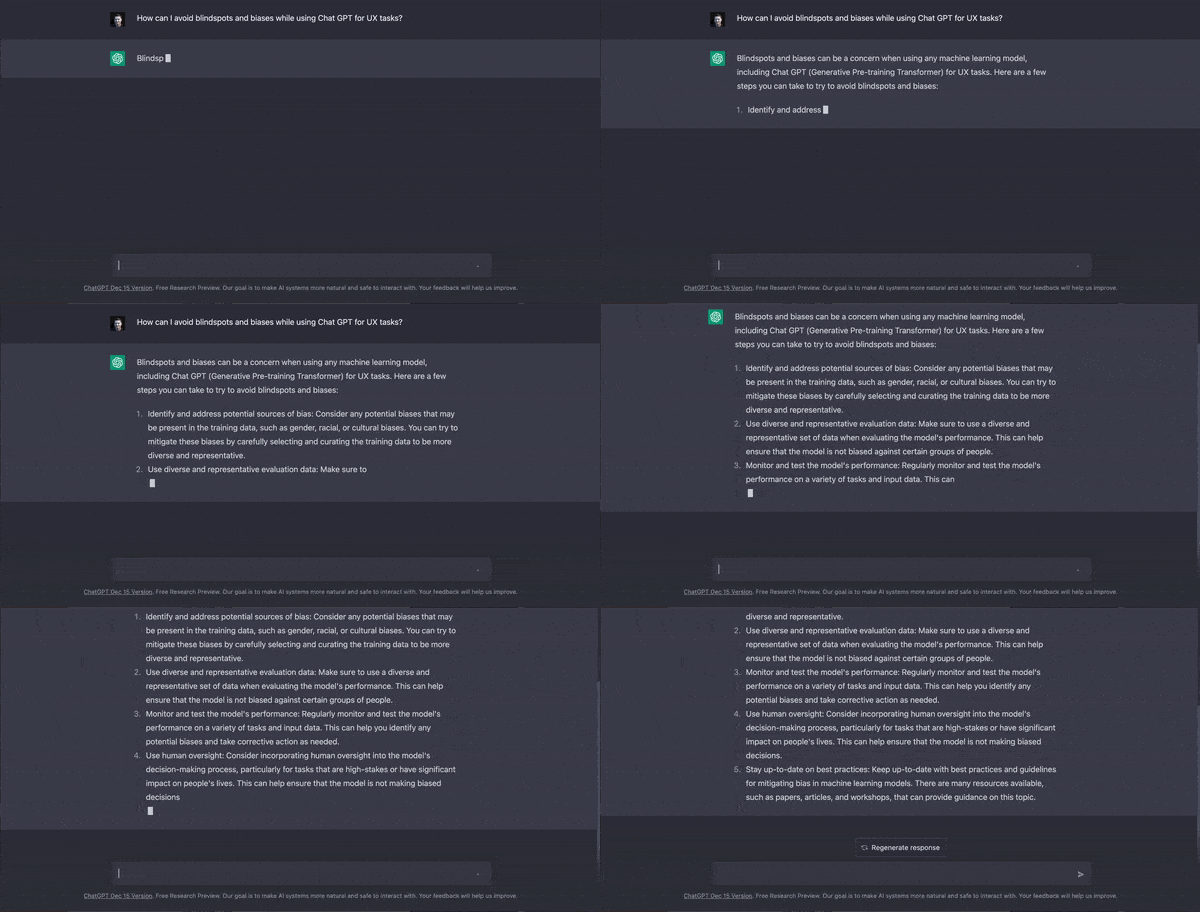
[Chat GPT advises on how to use itself, Chat GPT Research Preview, 2023]

Free Advanced Design Resources
Check out Free Resources like design tools and masterclasses from the Fountain Institute

[made with Midjourney]
35 UX-specific Chat GPT prompts to get started in AI-assisted design
Here are a bunch of templates you can use to get started using Chat GPT. These are pretty simple, but the more context, details, and data you provide, the better the results will be.
Best Chat GPT Prompts for UX
What are best practices around [topic]?
What’s a good process for a [topic] project?
List design and research methods that will help with [challenge].
What’s the best way to design a solution to this brief: [insert brief].
Write a brief for [challenge].
What design patterns work well for [context]?
What should I be aware of when designing for [context]?
Brainstorm design ideas around [opportunity].
How can I make my design process more inclusive to [user]
Come up with workshop activities for a workshop around [context].
Create wireframes for an [industry] experience for [user].
Create an SVG icon for [client].
Create prompts for an AI image generator for [context].
Write code for a [project]
Write survey questions about [context] for a [user]
Write micro-copy for a [context] used by a [user]
Write user tasks for a usability test on a [project]
Proofread this text: [insert text].
Act like the person described here: [insert persona details]. Here is my first question: “[insert question]”
Act like a CEO in tech. Here is my first question: “[insert question]”
Act as a statistician. Here is my first question: “[insert question]”
Act as a UX designer. Here is my first question: “[insert question]”
What are the best practices around [topic]
Create study notes on this: [insert text]
Identify common UX issues in [context].
What are the main user issues with [well-known product]
How should you design for specific cultural contexts like [context]?
Who are the competitors of [company]?
Extract keywords themes in this data: [insert data].
Summarize the problems in these interviews: [insert transcript].
Do sentiment analysis for this text: [paste data].
Summarize this text into TL;DR: [insert text].
Synthesize this text into a new design approach: [insert text].
Uncover ethical blindspots around [context].
Uncover potential user biases in [context].

Learning resources for ChatGPT
How to use ChatGPT
Get examples of how to use Chat GPT from Open AI, its creator
Get 100 more Chat GPT prompts from Damir Yalalov
Read crowdsourced example prompts for Chat GPT
Read GPT-3 Is the Best Journal I’ve Ever Used by Dan Shipper
Watch ChatGPT Tutorial - A Crash Course on Chat GPT for Beginners on Youtube
Issues with Chat GPT
Read 5 Ethics Issues for ChatGPT & Design by Pete Armitage
Read how The ChatGPT chatbot from OpenAI is amazing, creative, and totally wrong by Mashable
See what happened when an expert asked Chat GPT about the topic of her PhD thesis
See what happened when Chat GPT took a full SAT test
Read Becoming a chatbot: my life as a real estate AI’s human backup by Laura Preston
AI Image Generators
Watch a demo of Chat GPT-4 turning a napkin sketch into a Javascript website
Try out an excellent entry-level image creation tool, DALL-E, also by Open AI
See what’s possible to create an image like the ones in this article using Midjourney in the Midjourney Community Showcase
Watch a tutorial in using Midjourney, one of the top A.I.-generated image creators in Mastering mid-journey in 2023 | The Ultimate Guide by glibatree
Chat GPT and Design
Watch a masterclass about the UX strategy behind ChatGPT in How to Lead with UX Strategy by Jeff Humble
Watch a video of Chat GPT-4 turning a napkin sketch into a Javascript website instantly
Read about more UX-specific examples like brainstorming and coding icons in Exploring the Power of OpenAI ChatGPT for product designers by Edward Chechique
Read an academic paper on Innovation using an A.I.-Augmented Double Diamond by Sebastian G. Bouschery, Vera Blazevic, and Frank T. Piller

Get a Masterclass in Advanced UX Research
Watch this 60-minute webinar and learn how to level up your UX practice. This talk will prepare you to implement your system for research operations with the methods you need to conduct research continuously





Got a prompt for UX work you love for Chat GPT?
Share it in the comments, and I will add it to the article and credit you!